
Vitamin and supplement tracker
A supplement tracker app that knows iron and calcium don't mix
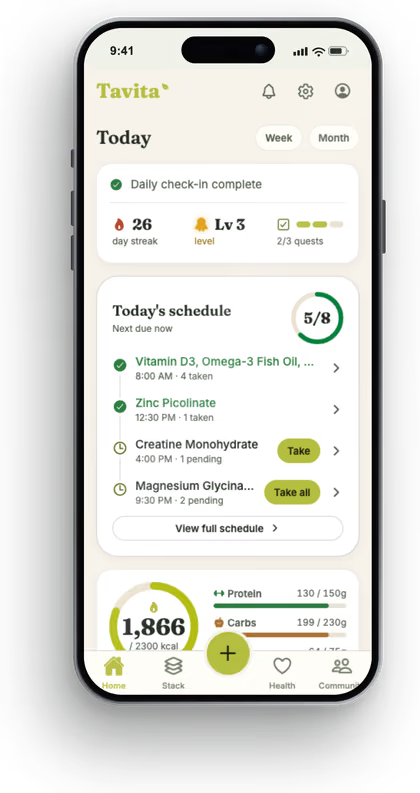
Tavita is a supplement tracker app that plans when you take each vitamin, not just whether you took it. It keeps iron away from calcium and puts vitamin D with a meal.
It also checks every supplement against the prescription medicines on your list, so a risky pair gets flagged before you take it.
Free to download on iPhone and Android
No account and no ads. Pro is optional.
Why timing matters
When you take a supplement changes what you get from it
Most vitamin trackers are logs. You tick a box, keep a streak, and move on. That's fine with two bottles. With six, the order starts to matter.
Some supplements get in each other's way. Calcium and iron compete, so taking them together means you absorb less of both (how calcium and iron compete). Fat-soluble vitamins like vitamin D absorb best alongside a meal with some fat in it.
Others matter because of your prescriptions. Calcium and iron supplements should be taken at least 4 hours apart from levothyroxine, a common thyroid medicine (MedlinePlus). St. John's wort can weaken the effects of many medicines, including birth control pills and some antidepressants, according to the National Center for Complementary and Integrative Health.
Tavita handles this when it builds your schedule. Iron and calcium land at different times, fat-soluble vitamins go with a meal, and a thyroid pill stays hours away from both. You get a reminder at each time and tap to mark it taken.
What you get
Everything in your stack, in one place
Supplements next to your prescriptions
Vitamins, supplements, and medicines share one list. Each new item is checked against the rest using a built-in library of over 15,000 known interaction pairs.
Scan the barcode, free
Scan a supplement's barcode to fill in its details. With Pro, you can scan the label itself instead.
Reminders at the right times
Your schedule is timed around when you wake, eat, and sleep, with a reminder for each slot. Mark doses taken or skipped and see how your week went.
Know before a bottle runs out
Add the number of capsules in a bottle and Tavita warns you when about a week's worth is left.
Pregnancy and nursing flags
Flags supplements and herbs to avoid while pregnant or breastfeeding, so you can ask your prescriber about them.
Food in the same app
Log meals by barcode or search to see calories, macros, and nutrients, without switching apps.
Supplements and medicines
Your supplements, checked against your prescriptions
Say you've taken ginkgo for years and your doctor starts you on warfarin. Add the new prescription by its generic name and Tavita flags the pair right away. It's one of the serious combinations the free instant check covers, and it works offline.
You take that to your doctor or pharmacist before the first dose. Tavita doesn't tell you to stop a supplement or change a dose. It makes sure the question gets asked.
Each schedule build also comes with a safety report that covers moderate interactions, like calcium with levothyroxine, which the instant check leaves out.
Free on the web
Two free tools you can use before installing anything
Both work in your browser, with no sign-up.
The supplement stack checkeradds up every supplement you take and shows the total for each nutrient against the reference intake and the upper limit. It's a quick way to spot a nutrient you're getting from three different bottles.
The vitamin and mineral library covers 33 nutrients with daily amounts and upper limits by life stage, food sources, and which ones work together or compete.
Questions
Supplement tracking questions
Which app is best for supplements?
The best one fits the problem you actually have. If you want a checklist and a streak, a simple tracker does the job. If you also take prescription medicine, or your stack has minerals that compete, pick an app that checks supplements against your medicines and plans when to take each one. Tavita does both, and the core of it is free.
Is there an app that tells you when to take supplements?
Yes. Tavita builds a daily schedule around when you wake up, eat, and go to bed, and sends a reminder at each time. It keeps iron and calcium apart, puts fat-soluble vitamins with a meal, and spaces supplements away from medicines they interfere with. Free includes one schedule build a month, and Pro rebuilds it whenever you like.
Is there an app that can scan for vitamins?
Tavita can scan a supplement's barcode for free and fill in its details when the product is listed in Open Food Facts, a free public product database. With Pro, you can point the camera at the label instead and Tavita reads it for you. It can't identify a loose pill by how it looks, so keep the bottle handy when you add something.
Can I track supplements and prescriptions in the same app?
Yes, and it's the main reason to use Tavita. Your medicines, vitamins, and supplements sit on one list, and each new item is checked against all the others: medicine with medicine, medicine with supplement, and supplement with supplement.
Do I need an account, and is it free?
You don't need an account. Tracking, barcode scanning, reminders, the instant interaction check, and one schedule build a month are free. Pro costs $12.99 a month or $59.99 a year and adds label scanning, unlimited schedule rebuilds, photo and voice meal logging, and weekly insight reports.
Keep reading
Related pages and free tools
Put your whole stack on a schedule
Add your supplements and medicines, let Tavita check them, and get reminders at the right times. Free on iPhone and Android, no account needed.
Free to download on iPhone and Android
Tavita gives general health information. It isn't a medical device and doesn't diagnose, treat, or give dosage advice. Talk to your doctor or pharmacist before you start, stop, or combine medicines.